
Adding a New Content Collection to My Astro Website
Just yesterday, I introduced the structural changes that I planned for this website. Lo and behold, today Concept Garden is already live.
I’m going to briefly outline the process.
helpers: Astro Docs and this Demo Blog
When I first started using the Astro framework, the blog was already setup with example posts and a predefined schema. Of course, I customised it to fit my needs, but what I didn’t know was how easy another collection can be added.
1. Add a new schema to content.config.ts
const conceptGarden = defineCollection({
	loader: glob({ base: './src/content/concept-garden', pattern: '**/*.{md,mdx}' }),
	schema: ({ image }) => z.object({
		title: z.string(),
		heroImage: image(),
		heroImagePosition: z.string().optional(),
		draft: z.boolean().optional(),
	}),
});
I wanted this collection to be as simple as possible in the frontmatter: no dates, no fancy layout, no description.
2. Add an index page and display all posts
Here’s what the folder structure looks like:
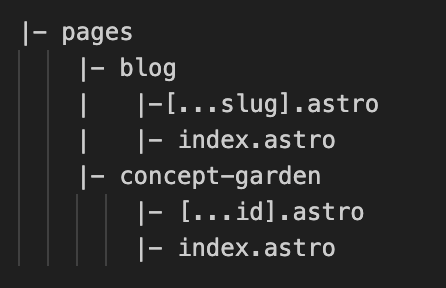
‘slug’ and ‘id’ are interchangeable: both generate individual routes for eachy entry in their respective collections.
On the index file, I query the collection with getCollection.
Thanks to the draft feature, I can view all my drafts in dev mode, while keeping them hidden in production.
const posts = await getCollection("conceptGarden", ({ data }) => {
  return import.meta.env.PROD ? data.draft !== true : true;
});
I’m displaying them in a simple grid layout.
3. Build static routes
As shown in the Astro Docs, with getStaticPaths() and getCollection an individual URL is generated for each entry in the collection.
In my case, only entries that are not marked with draft will be passed and displayed with a simple Concept layout.
---
import { getCollection, render } from 'astro:content';
import ConceptLayout from '../../layouts/Concept-1.astro';

export async function getStaticPaths() {
  const posts = await getCollection('conceptGarden', ({ data }) => {
  return import.meta.env.PROD ? data.draft !== true : true;
});
  return posts.map(post => ({
    params: { id: post.id },
    props: { post },
  }));
}

const { post } = Astro.props;
const { Content } = await render(post);

---
<ConceptLayout {...post.data}>
<Content/>
</ConceptLayout>
New entries are added to /src/content/concept-garden/.
That’s it, a new collection with minimal setup.